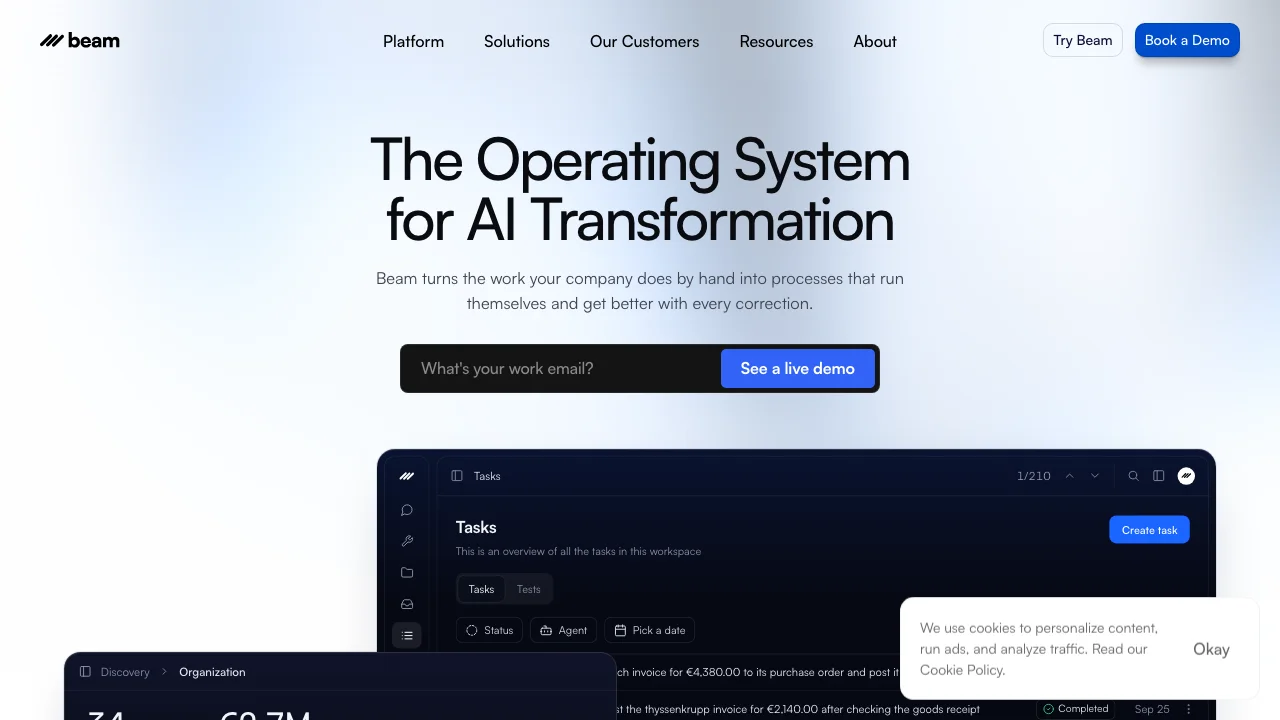

Beam AI
Beam AI is an enterprise platform for building and operating AI agents that automate bounded workflows. It supports no-code agent creation, human approvals, integrations, testing, and multiple deployment environments.
Visit Beam AI ↗- Category
- AI Agents
- Platforms
- Web-based application · Beam-hosted cloud in the EU, US, or GCC · Customer-managed cloud deployment · On-premises deployment
What is Beam AI?
Beam AI is an agentic automation platform for building and operating AI agents that run enterprise workflows. Agents can handle multi-step processes, incorporate team feedback into later runs, and pause critical steps for human approval. Organizations can deploy the platform in Beam-hosted regional clouds, their own cloud, or an on-premises environment.
Users can describe a task or idea in a workspace, then build and manage the agents that perform it. Agent flows can run from chat or triggers and can be tested before changes are published. Beam also provides templates, task testing, analytics, custom integrations, and connectors for existing business systems.
The platform is intended for companies and corporate groups. Documented workflows cover finance, accounting, banking, insurance, healthcare operations, HR, recruiting, sales, compliance, and other operational functions. Examples include screening resumes against role criteria, reconciling invoices, collecting KYC evidence, processing claims, and preparing accounting entries. These workflows define their starting points, stopping points, escalation paths, evidence, and required human controls.
Beam is available through web-based access and supports cloud or on-premises deployment. The supplied sources do not state public plan names or prices. Beam says it does not train on customer data.
Beam AI features
No-code agent building
Users describe work in chat, and Beam builds, tests, and connects the agent.
Human approval gates
Critical workflow steps can wait for approval while remaining steps run automatically.
Flow-based automation
Agent graphs can run from chat or triggers and support testing before publication.
Feedback learning
Team feedback is incorporated into subsequent agent runs.
Regional deployment
Deployment options include Beam clouds in three regions, customer clouds, and on-premises infrastructure.
Extensive integrations
Beam states that it supports more than 1,000 integrations and custom legacy-system connectors.
Bounded workflows
Workflow definitions identify starting points, stopping points, escalations, controls, evidence, and expected outputs.
Custom interfaces
Teams can receive use-case-specific applications that operate on the same agent.
Is Beam AI right for your workflow?
Product details from the vendor’s documentation.
Who it is for
- Companies and corporate groups
- Finance and accounting teams
- Banking operations teams
- Insurance operations teams
- HR and recruiting teams
- Healthcare operations teams
- Customer service teams
- Compliance teams
What you provide
- A task or idea entered in the workspace composer
- Approved transactions and supporting accounting records
- Resumes and approved role criteria
- KYC evidence and approved checks
- Invoices and approved purchasing evidence
- Application data, verified risk evidence, pricing rules, actuarial inputs, and product constraints
What you can create or export
- Built and managed AI agents
- Recruiter review queues with supporting resume evidence
- Traceable KYC review packages
- Accounting entries, checks, and exception queues
- Review-ready insurance price indications
- Accounting-ready invoice entries
- Adjuster review queues for insurance claims
Supported platforms
- Web-based application
- Beam-hosted cloud in the EU, US, or GCC
- Customer-managed cloud deployment
- On-premises deployment
Integrations
- SAP
- DATEV
- Salesforce
- Slack
- Zendesk
- Shopify
- Airtable
- ActiveCampaign
How it works
- Open the Beam workspace and select the active workspace with the workspace picker.
- Enter a task or idea in the workspace composer and send it to Beam AI.
- Use agent templates or open an agent to work with its Chat, Tasks, Flow, Learning, Configuration, and Analytics sections.
- Build the agent graph in Flow and enable Test mode before publishing changes.
Limits and requirements
- Critical workflow steps may wait for human approval.
- Accounting workflow automation excludes posting material entries without approval and changing accounting policy.
- Insurance pricing workflows exclude binding coverage, changing actuarial policy, and issuing an unapproved price.
- Missing evidence and out-of-range insurance pricing cases require human review.
- On-premises functionality and scope are based on the development status at delivery.
Access, licensing and data
- Beam provides customers with web-based access to the application.
- The documentation exposes a Connect API authenticated with an x-api-key.
- Beam says it never trains on customer data.
- Customers receive a non-exclusive right to use the application for their own business purposes during the contract term, within the agreed license scope.
Official sources (9)
These sources describe the vendor’s product. They do not represent hands-on testing by Artificin. Check the vendor for current pricing and terms.
- Leading Platform for Agentic Automation & AI Agents | Beam AI
- Beam AI | Data Security Policy
- Beam AI | Terms of Use
- Industry Solutions for Implementing AI Agents | Beam AI
- Welcome to Beam - Beam Academy
- Integrations for AI Agents | Beam AI
- AI Agent Workflow Use Cases | Beam AI
- Insurance Pricing | Beam AI
- Accounting Workflow Automation | Beam AI
Use cases
- Compare resumes with approved role criteria and route evidence to recruiters for review
- Collect KYC evidence, run approved checks, and prepare a traceable compliance review package
- Reconcile invoices against purchasing evidence and route unresolved differences
- Organize insurance claim intake and evidence for an adjuster review queue
- Prepare accounting entries and checks from approved transactions and supporting records
- Coordinate employee onboarding tasks, approvals, and system updates
- Capture invoice data and prepare an accounting-ready entry after validation and exception routing
- Coordinate candidate and interviewer availability, issue confirmations, and escalate conflicts
Similar tools
Matched by shared tasks, capabilities and categories.
CrewAI builds and runs multi-agent automations through a visual editor or code-first API, with workflow tracing and…
- Code
- Text
- Free plan:
- 50 workflow executions/month

Dify builds and manages data-connected AI agents, chatbots, and visual workflows. Publish applications as web apps…
- Chat
- Text
- Free plan:
- 200 message credits; 5 apps; 1 member
Flowise is an open-source visual builder for AI agents, chatbots and LLM workflows, with knowledge retrieval…
- Chat
- Text
- Free plan:
- 2 flows and assistants; 100 predictions/month; 5MB storage
- From
- $35/month

n8n connects AI agents, APIs, and business processes in visual workflows with optional code steps. It supports human…
- From
- 20€/month, billed annually

Build and manage specialist AI agents with visual workflows, shared knowledge and event-based triggers. Relevance AI…
- Text

Sierra is a business platform for building and managing customer-facing AI agents across voice, chat, email, WhatsApp…
- Chat
- Voice
- Text
Beam AI FAQ
What does Beam AI do?
Beam AI builds and runs AI agents that automate complex enterprise workflows. Its documented workflows include explicit boundaries, human controls, evidence, and operational outputs.
Can agents be built without coding?
Yes. Beam AI says users can describe the work in chat, after which the platform builds, tests, and connects the agent.
Can people approve important agent actions?
Yes. Beam AI can pause critical steps for approval, while other parts of the workflow continue automatically.
Where can Beam AI be deployed?
Beam AI can be deployed in its EU, US, or GCC cloud environments, in a customer's own cloud, or fully on premises.
Which systems can Beam AI connect to?
Beam AI says it offers more than 1,000 integrations, including SAP, DATEV, Salesforce, Slack, Zendesk, and Shopify, plus custom connectors for legacy systems.
Does Beam AI provide an API?
Beam AI documentation includes a Connect API and an API reference using an x-api-key for authentication.
Does Beam AI use customer data for model training?
Beam AI states that it never trains on customer data.
Who is Beam AI intended for?
Beam AI's terms describe its customers as companies and corporate groups. Its solution pages address teams in finance, banking, insurance, HR, recruiting, healthcare, customer service, and other operational areas.
How are workflow exceptions handled?
Beam AI workflows identify where an agent starts, stops, and escalates. Approvals, permissions, exceptions, and supporting evidence remain visible to the workflow owner.
Directory listing. Confirm current features, pricing and terms with the provider. User ratings are separate from editorial testing.
- Leading Platform for Agentic Automation & AI Agents | Beam AI
- Beam AI | Data Security Policy
- Beam AI | Terms of Use
- Industry Solutions for Implementing AI Agents | Beam AI
- Welcome to Beam - Beam Academy
- Integrations for AI Agents | Beam AI
- AI Agent Workflow Use Cases | Beam AI
- Insurance Pricing | Beam AI
- Accounting Workflow Automation | Beam AI
Report outdated information or request ownership of this listing
Help keep Beam AI accurate. Include an official source and describe the correction. Ownership requests are reviewed manually and do not grant editing access.
Beam AI user ratings
Be the first to rate Beam AI. It takes four clicks, and a written review is optional.