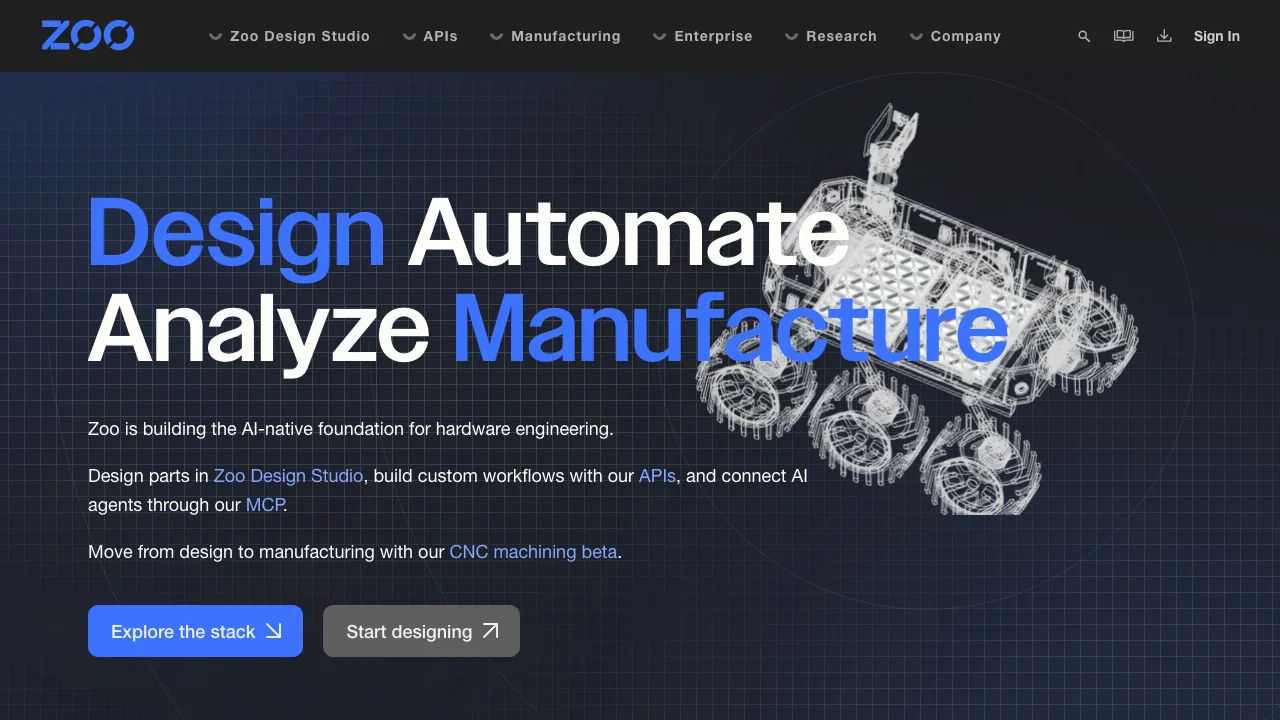

Zoo
Zoo provides AI-assisted CAD design, geometry and file-conversion APIs, agent tools, and code-based workflows for hardware engineering.
Visit Zoo ↗- Category
- 3D
- Pricing
- Freemium
- Platforms
- Zoo Design Studio desktop app · Zoo Design Studio in a browser · Command line through the Zoo CLI
- Creates
- Code
- Price from
- $0.0083 per second
What is Zoo?
Zoo is a hardware-design platform built around CAD software, developer APIs and tools for AI agents. Its stack includes Zoo Design Studio for part design, a geometry engine for creating and editing CAD geometry, an Agent API for adding AI-assisted CAD to applications, and a File Format API for CAD file conversion. Zoo MCP connects AI agents to its tools.
Users can work in Zoo Design Studio through a desktop app or browser and converse with Zookeeper, its AI CAD agent. Developers can create an API token, call documented JSON APIs, run workflows from the terminal with the Zoo CLI, or use KCL to build parametric and generative CAD models. The platform can return CAD geometry or converted CAD files, depending on the tool used.
Zoo addresses mechanical engineers, CAD users, developers, organizations and builders of AI agents. Supported workflows include designing parts, creating custom CAD applications, automating CAD through scripts or CI, converting file formats and connecting CAD capabilities to agents.
Zoo Design Studio is free to start after signup. API access starts free and then uses pay-as-you-go billing at $0.0083 per second. Only successful billable API operations and sessions consume usage, including hosted Zoo operations invoked through MCP.
Zoo features
AI CAD agent
Users can converse with Zookeeper inside Zoo Design Studio for AI-assisted CAD work.
Geometry API
The cloud-native Engine API creates and edits CAD geometry.
CAD file conversion
The File Format API converts between CAD formats through a unified interface.
Parametric CAD code
KCL supports parametric, generative and auditable CAD models.
Workflow automation
The Zoo CLI runs workflows from a terminal and automates them in scripts.
Agent connection
Zoo MCP gives AI agents access to Zoo tools.
Hybrid design studio
Zoo Design Studio is available as a desktop app and in a browser.
Manufacturing beta
Users can submit a part through Zoo's portal for manufacturing and shipment.
Zoo pricing
API pay-as-you-go
$0.0083 per second
- Only successful billable API operations and sessions consume usage.
- Some plans include monthly API usage, with allowances varying by plan.
Zoo says API access starts free and then uses pay-as-you-go billing. Failed API calls are not charged, while successful billable operations and sessions consume usage, including hosted operations called through Zoo MCP.
Is Zoo right for your workflow?
Product details from the vendor’s documentation.
Who it is for
- Mechanical engineers
- CAD users
- Developers
- Organizations
- AI agent builders
What you provide
- Natural-language conversations with the Zookeeper AI CAD agent
- KCL code for parametric and generative CAD models
- CAD files submitted for format conversion
- API requests through documented JSON interfaces
- Parts submitted through the manufacturing portal
What you can create or export
- CAD geometry created or edited through the Engine API
- Converted CAD files through the File Format API
- Parametric, generative and auditable CAD models created with KCL
- Manufactured parts shipped through the CNC machining beta
Supported platforms
- Zoo Design Studio desktop app
- Zoo Design Studio in a browser
- Command line through the Zoo CLI
Integrations
- Zoo MCP connection for AI agents
- SAML single sign-on for enterprise
How it works
- Sign up for Zoo.
- For interactive CAD work, open Zoo Design Studio and begin designing or converse with Zookeeper.
- For API use, enter the developer portal and create an API token.
- Use the documentation to integrate Zoo APIs into an application or workflow.
Limits and requirements
- Only successful billable API operations and sessions consume API usage.
- Hosted Zoo operations called through Zoo MCP count as external API usage.
- Monthly included API usage varies by plan.
- Manufacturing is described as a beta.
Access, licensing and data
- Zoo Design Studio requires signup and is free to get started.
- Developers can create API tokens through Zoo's developer portal.
- Each authorized user must create an account, and an account may only be used by the person for whom it was created.
- The terms grant use of the services for internal business purposes, subject to applicable order-form limits.
- Zoo states that service fees are non-refundable.
- Enterprise SAML single sign-on is documented.
Official sources (9)
These sources describe the vendor’s product. They do not represent hands-on testing by Artificin. Check the vendor for current pricing and terms.
Use cases
- Design hardware parts in Zoo Design Studio
- Build a generative CAD application with the Engine API
- Integrate AI CAD assistance into an application
- Automate CAD workflows in scripts or CI with the Zoo CLI
- Convert between CAD file formats
- Use Zoo's MCP server as a tool for AI agents
- Submit a designed part for CNC manufacturing through the beta
Similar tools
Matched by shared tasks, capabilities and categories.

Create and edit 3D models effortlessly with CAD with AI. Upload SVG files and generate models in no time.
3D AI Studio generates textured 3D models from text prompts or images. It also supports texturing, remeshing, rigging…
- Images
- Video
- Free plan:
- Free credits for selected tools
- From
- $12/month, billed annually

Create CAD files and meshes from natural language prompts effortlessly.

AI-powered CAD tool that simplifies design workflows and enhances productivity.
Langflow is a visual, Python-based builder for AI application workflows. It supports agents, MCP connections, custom…
WorldEngen is an AI-assisted 3D production editor that turns prompts, reference boards and rough ideas into assets and…
- Images
- Video
Zoo FAQ
What does Zoo provide?
Zoo provides CAD software for designing parts, APIs for geometry, AI assistance and file conversion, plus MCP tools for connecting AI agents.
Can Zoo be used in a browser or as a desktop app?
Zoo Design Studio is described as hybrid CAD software available in a desktop app or browser.
Does Zoo offer an API?
Yes. Zoo documents an Engine API, Agent API and File Format API, with JSON interfaces and generated references for endpoints, schemas, authentication and WebSocket protocols.
How do developers get started with Zoo's APIs?
Developers sign up, enter Zoo's developer portal and create API tokens before integrating the tools into an application or workflow.
How much do Zoo API calls cost?
Zoo displays pay-as-you-go API pricing of $0.0083 per second. Some plans include monthly API usage, with allowances varying by plan.
Are failed Zoo API calls charged?
No. Zoo states that failed API calls are not charged and that only successful billable calls are processed for billing.
How is Zoo MCP billed?
Zoo says MCP has no separate fee, but hosted Zoo operations invoked through MCP count as external API usage.
Is Zoo Design Studio free?
Zoo says Design Studio is free to get started after creating an account.
What is KCL?
Zoo describes KCL, or KittyCAD Language, as a code-based way to create parametric, generative and auditable CAD models.
Does Zoo support enterprise login?
Zoo documents SAML single sign-on for enterprise employees.
Directory listing. Confirm current features, pricing and terms with the provider. User ratings are separate from editorial testing.
Report outdated information or request ownership of this listing
Help keep Zoo accurate. Include an official source and describe the correction. Ownership requests are reviewed manually and do not grant editing access.
Zoo user ratings
Be the first to rate Zoo. It takes four clicks, and a written review is optional.