
3D AI Studio
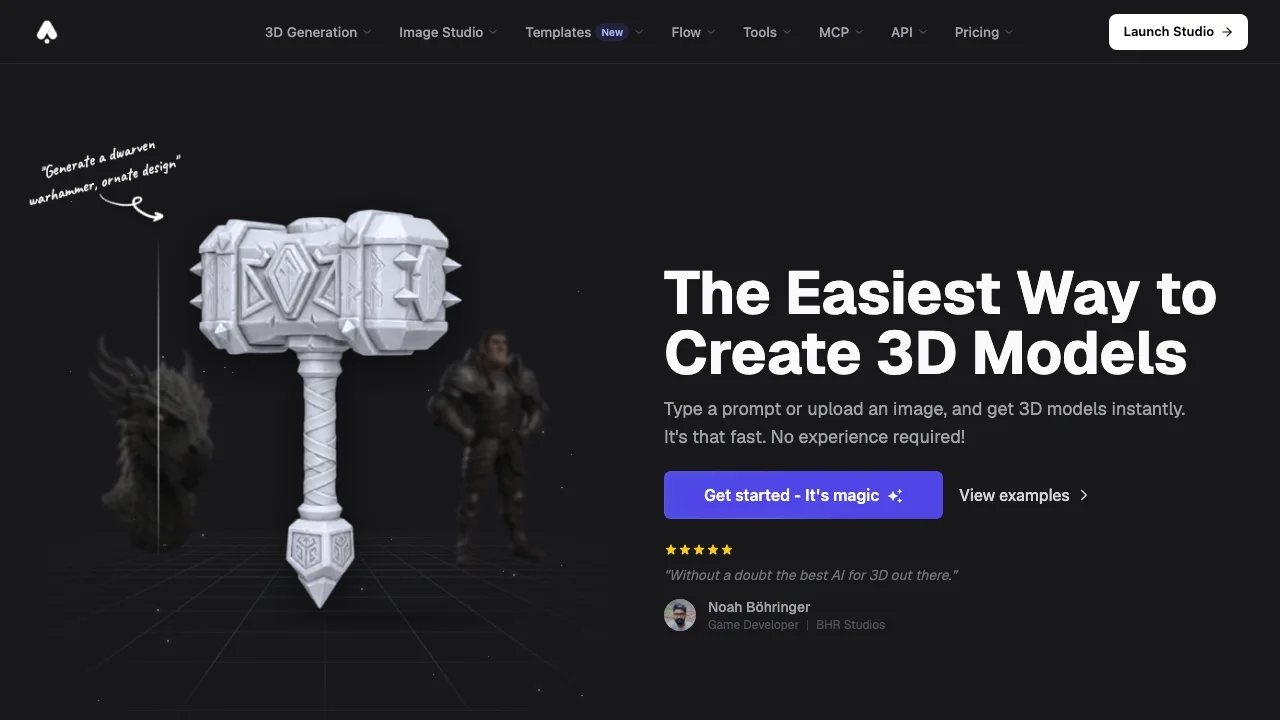
3D AI Studio generates textured 3D models from text prompts or images. It also supports texturing, remeshing, rigging, processing and export for 3D software, game engines and printing.
Visit 3D AI Studio ↗- Category
- 3D
- Pricing
- Freemium
- Platforms
- Web app in current Chrome, Edge, Firefox or Safari browsers with JavaScript and WebGL enabled
- Creates
- Images · Video
- Free plan
- Free credits for selected tools
- Price from
- $12/month, billed annually
What is 3D AI Studio?
3D AI Studio is an AI toolkit for creating textured 3D models from text prompts, images, sketches, concept art and SVG files. It also provides tools for AI texturing, remeshing, rigging, format conversion, mesh repair and preparing models for 3D printing. Users can choose among the platform’s own Prism engines and third-party generation engines for each generation.
To create a model, a user signs up, uploads an image or writes a prompt, and then downloads the generated textured mesh. Models can be exported for use in software such as Blender, Unity, Unreal Engine, Maya, ZBrush and Godot. Supported uploads include common image and 3D file formats, while documented exports include GLB, FBX, OBJ and STL. A visual Flow editor can connect prompts, images, edits and 3D generation into reusable pipelines.
The product is presented for game development, film production, product and interior design, education, VR or AR, and 3D printing. Paid plans add monthly credit allocations, broader tool access and commercially usable private assets. The Pro plan includes a team workspace, shared projects and three seats. Selected tools can be tried with free credits without a credit card, but output created without a qualifying paid plan or separate commercial licence is restricted to personal, non-commercial use.
3D AI Studio features
Text to 3D
Creates textured 3D models from written descriptions.
Image to 3D
Converts photos, sketches, illustrations and other supported images into downloadable textured meshes.
AI texturing
Generates PBR materials from prompts and supports painting custom details directly onto models.
Mesh processing
Cleans topology, reduces polygon counts, repairs meshes and generates levels of detail.
Multiple engines
Allows users to select Prism and supported third-party engines separately for each generation.
Visual workflows
Chains text, image, editing, video and 3D steps on a reusable node canvas.
MCP connector
Generates models through supported assistants including Claude, ChatGPT, Cursor and Codex.
Format exports
Provides formats suited to 3D software, game engines and printing, including GLB, FBX, OBJ and STL.
3D AI Studio pricing
Basic
$12 per month, billed annually
Annual billing: $144 billed annually
- 1,000 credits per month
- Text to 3D and Image to 3D
- AI image generation and editing
- exports in major 3D formats
- private, commercially usable assets.
Studio
$23 per month, billed annually
Annual billing: $276 billed annually
- 3,500 credits per month
- everything in Basic
- all creative and production tools
- multi-image to 3D generation
- faster generation times.
Pro
$139 per month, billed annually
Annual billing: $1668 billed annually
- 18,000 credits per month
- everything in Studio
- team workspace and shared projects
- three team seats
- highest-priority generation.
Selected tools can be tried with free credits without a credit card. Paid plans use monthly credit allocations, and the displayed prices are monthly equivalents billed annually. The vendor says subscriptions can be cancelled at any time.
Safety & privacy
Documented policies and disclosures; not a security certification.
Is 3D AI Studio right for your workflow?
Product details from the vendor’s documentation.
Who it is for
- Game developers and game studios
- Film and animation production teams
- Product and industrial designers
- Interior designers
- Educators
- 3D-printing creators
- VR and AR creators
- 3D artists and creative teams
What you provide
- Text prompts describing a desired model
- PNG, JPG, JPEG or WebP images
- Photos, sketches and concept art
- SVG files
- GLB, GLTF, FBX, OBJ or STL models for supported processing tools
- PNG or JPG texture maps
What you can create or export
- Textured, downloadable 3D meshes
- GLB models with embedded textures
- FBX models for game engines and animation software
- OBJ models with associated MTL and texture files
- STL models for 3D printing
- PBR textures and materials
- Optimized meshes with reduced polygon counts or generated levels of detail
Supported platforms
- Web app in current Chrome, Edge, Firefox or Safari browsers with JavaScript and WebGL enabled
Integrations
- MCP connector for Claude
- MCP connector for ChatGPT
- MCP connector for Cursor
- MCP connector for Claude Code
- MCP connector for Codex
- MCP connector for VS Code Copilot
- REST API
How it works
- Create an account with an email address.
- Upload an image or enter a text prompt.
- Generate a textured 3D model.
- Choose an export format suitable for the intended software or 3D printer.
- Download the model and import it into the target tool.
Limits and requirements
- Generation and processing consume credits; insufficient credits produce a quota-exceeded error.
- Free output is limited to personal, non-commercial use unless a commercial licence is purchased.
- Image uploads must use PNG, JPG, JPEG or WebP; supported 3D uploads are GLB, GLTF, FBX, OBJ and STL.
- Upload size limits vary by tool and are displayed in each upload area.
- The web viewer requires JavaScript, WebGL and a supported current browser; Internet Explorer is not supported.
- Generation time varies by engine and quality settings, from about one minute to as long as 10–12 minutes according to the troubleshooting guide.
- The terms do not guarantee that generated output is unique, exclusive or free of third-party or open-source components.
Access, licensing and data
- An email address is required to create an account and use the service.
- Selected tools are available with free starting credits and do not require a credit card.
- A public API and an MCP server are covered by the product’s privacy notice and documentation.
- Output generated without a qualifying paid plan or purchased commercial licence is licensed only for personal, non-commercial use.
- Qualifying paid-plan output receives a worldwide, perpetual, non-exclusive, transferable and sublicensable commercial licence, subject to the terms and exclusions.
- The vendor states that prompts, uploads and outputs are not used to train AI models.
- Users can mark output private; the terms say other users cannot access it unless it is explicitly shared.
Official sources (9)
These sources describe the vendor’s product. They do not represent hands-on testing by Artificin. Check the vendor for current pricing and terms.
- 3D AI Studio - Generate 3D Models from Image or Text in Seconds
- Dashboard - Manage Your AI-Generated 3D Models, Images & Projects | 3D AI Studio
- Privacy Notice - 3D AI Studio
- Pitch Dev Studios × 3D AI Studio – Case Study
- 3D AI Studio - Terms of Service | AGB
- AI Use Cases - Unity, Game Development, 3D Printing | 3D AI Studio
- 3D AI Studio Docs: Guides, Tutorials & API Reference
- Troubleshooting: Failed Generations & Uploads | 3D AI Studio Docs
- Game Engine & 3D Software Integrations | 3D AI Studio Docs
Use cases
- Create game assets for Unity, Unreal Engine and Godot projects
- Prepare models for 3D printing
- Develop film and animation assets
- Create product and industrial design concepts
- Produce assets for VR and AR projects
- Generate interior design and architectural models
- Build sci-fi visual-development concepts and hero props
Similar tools
Matched by shared tasks, capabilities and categories.

Create stunning 3D models from text and images in seconds with Meshy, the intuitive AI 3D model generator.

Create stunning 3D models in seconds using text and images with Tripo AI.

A powerful 3D generative model for creating high-quality 3D assets from text and images.

The fastest way to create 3D models with AI from images.
WorldEngen is an AI-assisted 3D production editor that turns prompts, reference boards and rough ideas into assets and…
- Images
- Video

The fastest AI STL generator for creating 3D printable models from images and text prompts.
3D AI Studio FAQ
What can 3D AI Studio use to generate a 3D model?
3D AI Studio can generate textured models from text prompts, photos, sketches, concept art and SVG files.
Which image and 3D formats can be uploaded?
3D AI Studio accepts PNG, JPG, JPEG and WebP images. Supported 3D uploads include GLB, GLTF, FBX, OBJ and STL.
Which browsers does 3D AI Studio support?
3D AI Studio supports current versions of Chrome, Edge, Firefox and Safari with JavaScript and WebGL enabled. Internet Explorer is not supported.
Are credits returned after a failed generation?
3D AI Studio says credits are automatically returned when a generation or processing step fails. Users may need to refresh the page or wait a few minutes for the balance to update.
Can models from 3D AI Studio be used commercially?
Output generated during an active qualifying paid subscription, or covered by a separately purchased commercial licence, receives the commercial rights described in 3D AI Studio’s terms. Output generated without one is licensed only for personal, non-commercial use.
Does 3D AI Studio use prompts or uploads to train AI models?
The 3D AI Studio privacy notice says prompts, uploads and outputs are not used to train AI models.
Can 3D AI Studio models be used in common 3D software and game engines?
Yes. The documentation provides export and import workflows for Blender, Unity, Unreal Engine, ZBrush, Maya and Godot using formats such as GLB, FBX and OBJ.
Does 3D AI Studio require an account?
Yes. The privacy notice says an email address is required to create an account and use 3D AI Studio.
Directory listing. Confirm current features, pricing and terms with the provider. User ratings are separate from editorial testing.
- 3D AI Studio - Generate 3D Models from Image or Text in Seconds
- Dashboard - Manage Your AI-Generated 3D Models, Images & Projects | 3D AI Studio
- Privacy Notice - 3D AI Studio
- Pitch Dev Studios × 3D AI Studio – Case Study
- 3D AI Studio - Terms of Service | AGB
- AI Use Cases - Unity, Game Development, 3D Printing | 3D AI Studio
- 3D AI Studio Docs: Guides, Tutorials & API Reference
- Troubleshooting: Failed Generations & Uploads | 3D AI Studio Docs
- Game Engine & 3D Software Integrations | 3D AI Studio Docs
Report outdated information or request ownership of this listing
Help keep 3D AI Studio accurate. Include an official source and describe the correction. Ownership requests are reviewed manually and do not grant editing access.
3D AI Studio user ratings
Be the first to rate 3D AI Studio. It takes four clicks, and a written review is optional.
Rate 3D AI Studio
Log in to rate 3D AI Studio in four clicks. A written review is optional.
Log In to Rate